
Single campus
One institution, scoped modules
Custom quote Per institution · scoped modules
- Core Financials modules you need
- Dedicated tenant & subdomain
- Implementation & training support
One ledger for fees, payroll, and institutional accounting — not three systems reconciled by hand.
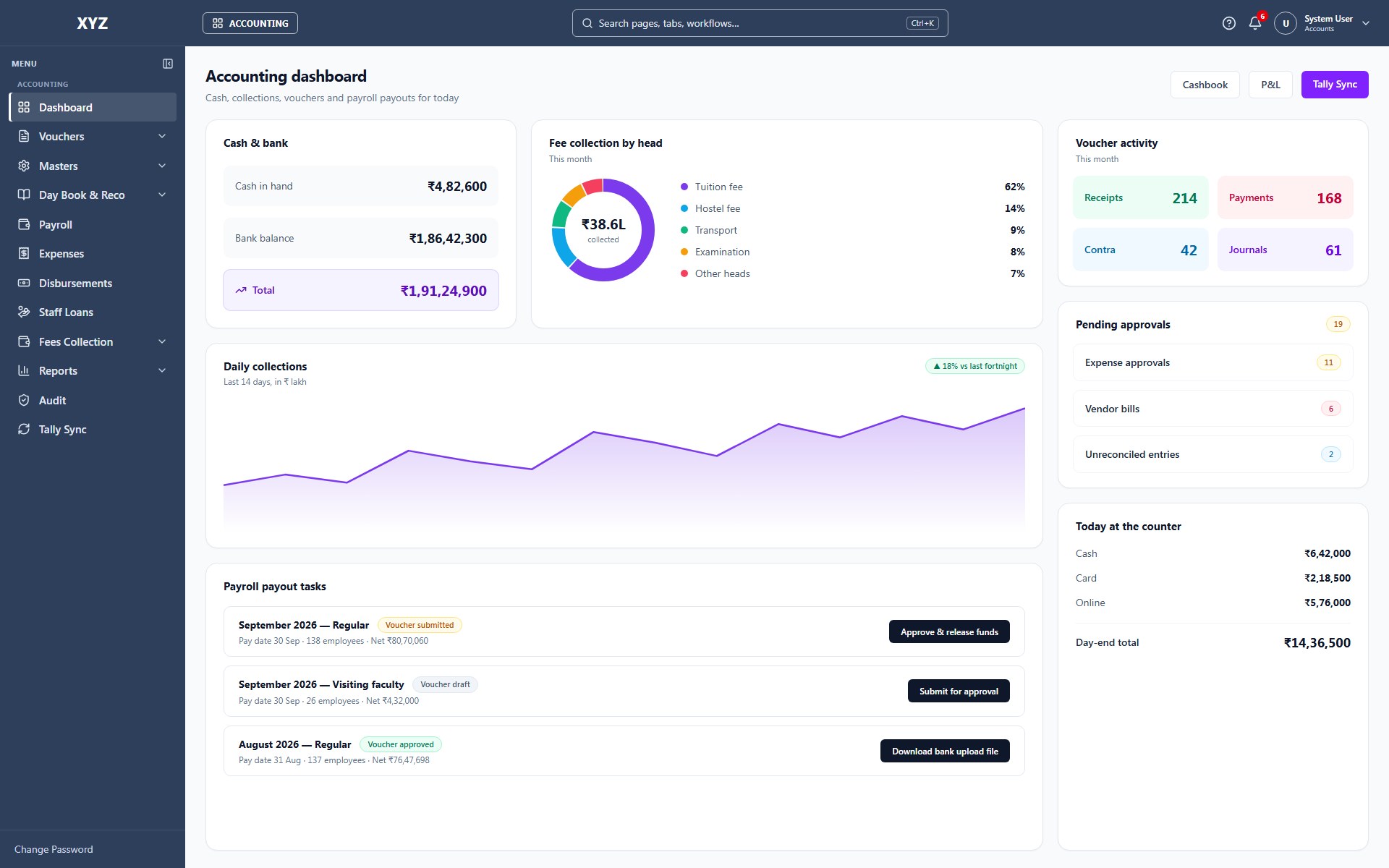
Tuling Financials is the accounting layer of the Tuling platform — built so payroll, fees, and institutional accounting share one ledger instead of three systems reconciled by hand at month-end.
Most institutions run a fee-collection tool, a payroll system, and Tally as three disconnected systems, with someone manually re-entering salary and fee journals into Tally every month. Tuling Financials removes that step: payroll postings and fee ledger entries land in the same general ledger automatically, and Tally-ready journals are generated for whichever parts of your workflow still need them.
Discount and waiver approvals, budget sign-offs, and audit trails are part of the transaction flow itself — not a policy document that depends on someone remembering to follow it.
Fee structures originate in Tuling SIS and post directly into the ledger here. Payroll runs from Tuling HCM generate payment vouchers and bank transfer exports without manual salary journal entry — the kind of connection that’s simply not possible when accounting, HR, and student systems come from three different vendors.

Capabilities
The capabilities that make Financials more than a records system.
Walk-in fee collection for enrolled students and registration fees for enquiries — search, collect, receipt, and day-end deposit in one cashier workspace.
Chart of accounts, cost centers, banks, and vouchers — a real double-entry accounting core, not a fee-collection tool wearing an accounting label.
Fee structures, demand bills, online collection, discounts and waiver approvals, and a per-student fee ledger tied directly to Tuling SIS.
Payroll runs from Tuling HCM post directly into the general ledger — payment vouchers and bank transfer exports generated automatically, no manual salary journal entry.
Salary and fee journals sync in a Tally-compatible format, so your finance team's existing workflow doesn't have to change.
Discount and waiver approvals, budget sign-offs, and audit trails built into the workflow, not enforced by a paper policy nobody follows.
Modular entitlements — enable only what your institution needs.
How Financials connects to the rest of the platform.
Licensing
Every deployment is scoped to your student and staff count, modules, and campuses. We prepare a formal proposal — no published list price.
One institution, scoped modules
Custom quote Per institution · scoped modules
Most common for groups
Roll-up reporting across campuses
Custom quote Per institution · scoped modules
HCM, SIS, Financials & more connected
Custom quote Per institution · scoped modules
Next steps
Walk through Financials with the product team — live ERP, your modules, your questions.
Schedule demo →Institution platform overview PDF for proposals and internal review.
Get PDF →See how this product connects to HCM, SIS, Tally, Power BI, and more.
View integrations →Request a formal quote scoped to your campus size and module list.
Contact sales →FAQ